
summarize
Get fast, intelligent summaries and slide extractions from URLs, YouTube, podcasts, and files via a browser side panel or CLI.

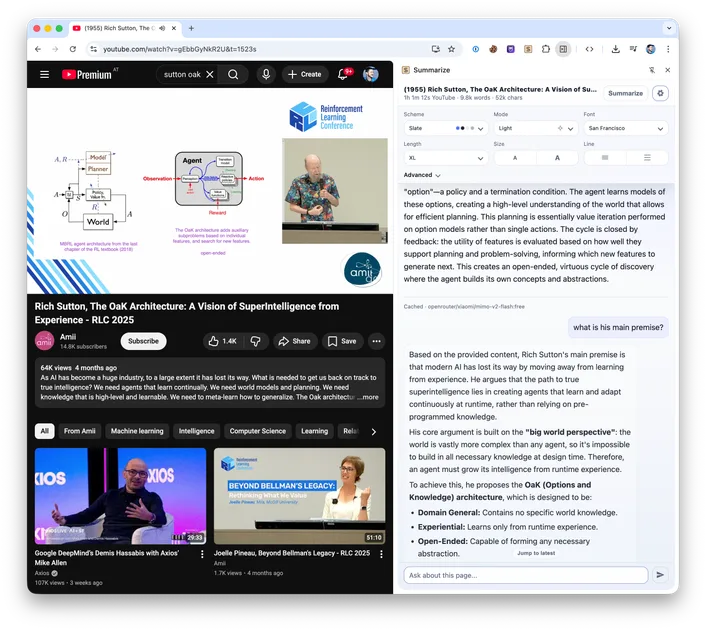
Suggested prompts
About this skill
Summarize
Fast summaries from URLs, files, and media. Works in the terminal, a Chrome Side Panel and Firefox Sidebar.
Core Capabilities
- Chrome Side Panel chat: Streaming agent with history inside the sidebar.
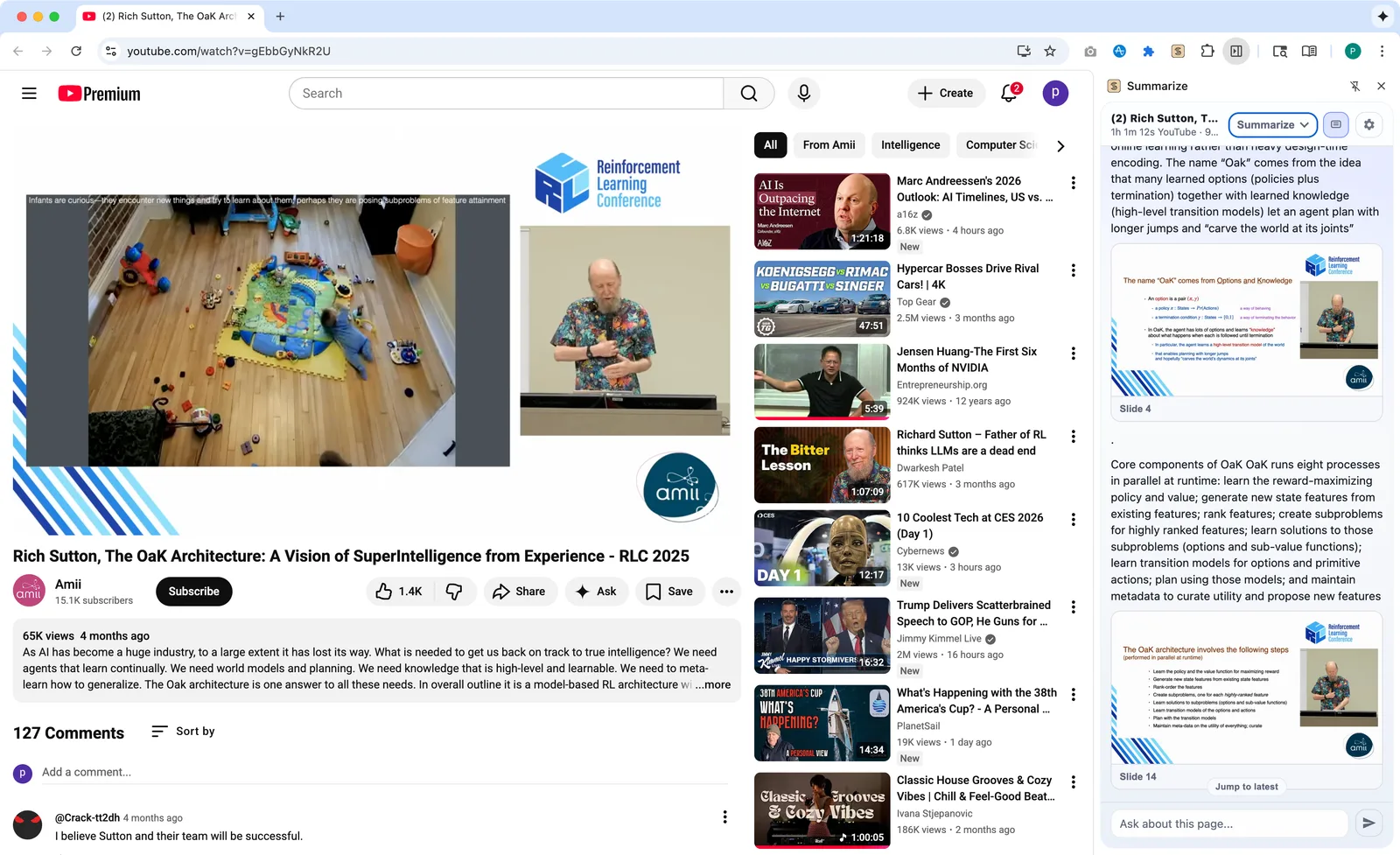
- Video slides: Screenshots + OCR + transcript cards for YouTube, direct video URLs, and local video files.
- Media-aware summaries: Auto-detect video/audio vs page content.
- Coding CLI backends: Codex, Claude, Gemini, Cursor Agent, OpenClaw, OpenCode, GitHub Copilot, Antigravity, pi.
- Streaming Markdown: With metrics and cache-aware status.
- CLI supports: URLs, files, podcasts, YouTube, audio/video, PDFs.
Chrome Extension
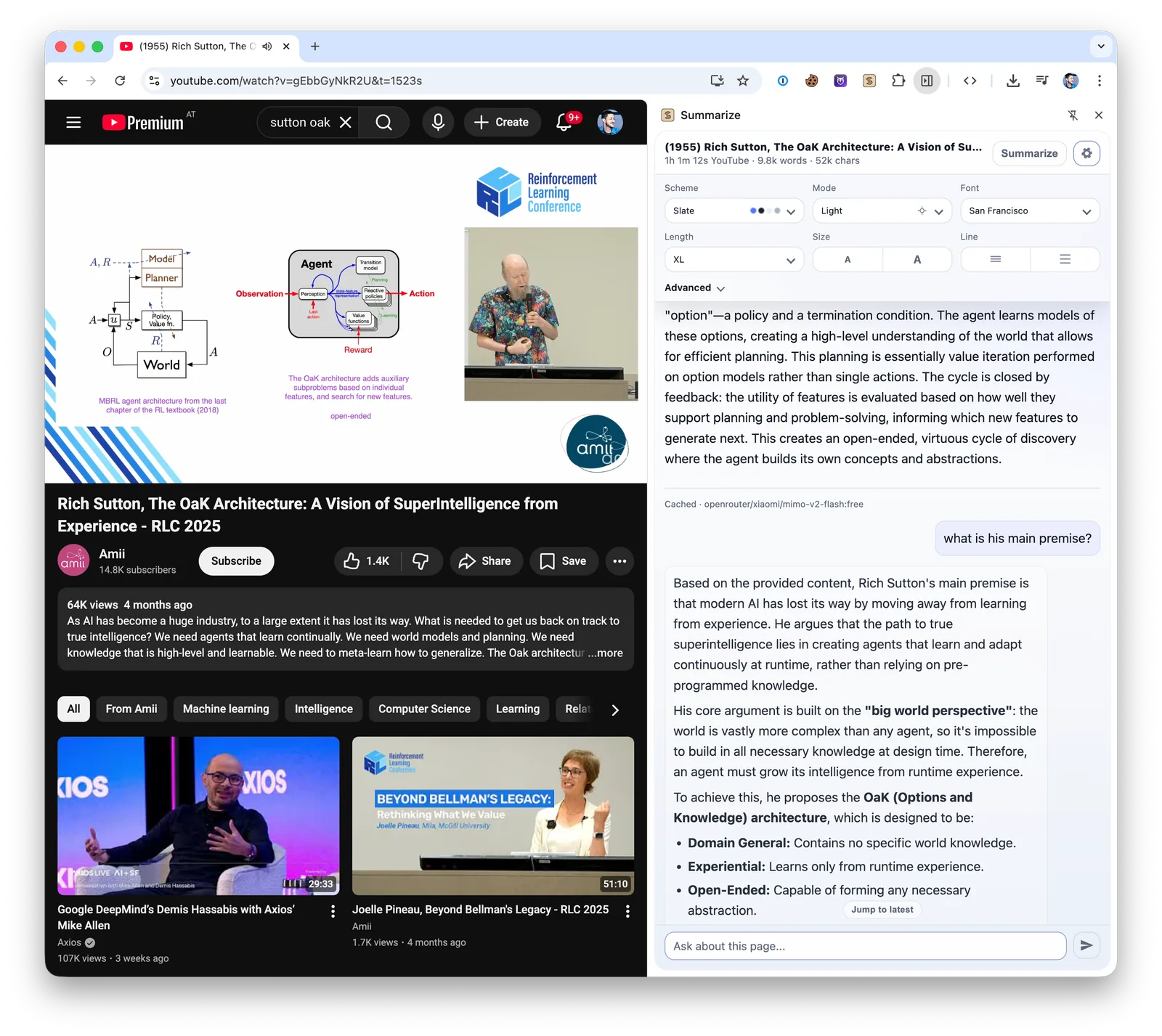
One-click summarizer for the current tab. Chrome Side Panel + Firefox Sidebar + local daemon for streaming Markdown.
Chrome Web Store: Summarize Side Panel
YouTube slide screenshots (from the browser):
Beginner Quickstart (Extension)
- Install the extension (Chrome Web Store link above) and open the Side Panel.
- Choose Direct or Daemon. Direct uses Gemini Nano by default when no provider key is configured, or calls your selected provider from Chrome.
- Choose Browser media for daemonless transcription/slides. Optional: install the CLI and pair the daemon for native tools, CLI model fallbacks, OCR, and broader media support.
Notes:
- Summarization only runs when the Side Panel is open.
- Auto mode summarizes on navigation (incl. SPAs); otherwise use the button.
- Daemon is localhost-only and requires a shared token.
- Autostart: macOS (launchd), Linux (systemd user), Windows (Scheduled Task).
Slides (Extension)
- Select Video + Slides in the Summarize picker.
- Slides render at the top; expand to full-width cards with timestamps.
- Click a slide to seek the video; toggle Transcript/OCR when OCR is significant.
- Browser mode uses MediaBunny with native WebCodecs and ranged network reads for fetchable videos, then falls back to visible-tab capture when the source or codec is unavailable.
- Daemon mode adds
yt-dlp, native ffmpeg, and optionaltesseractOCR.
CLI
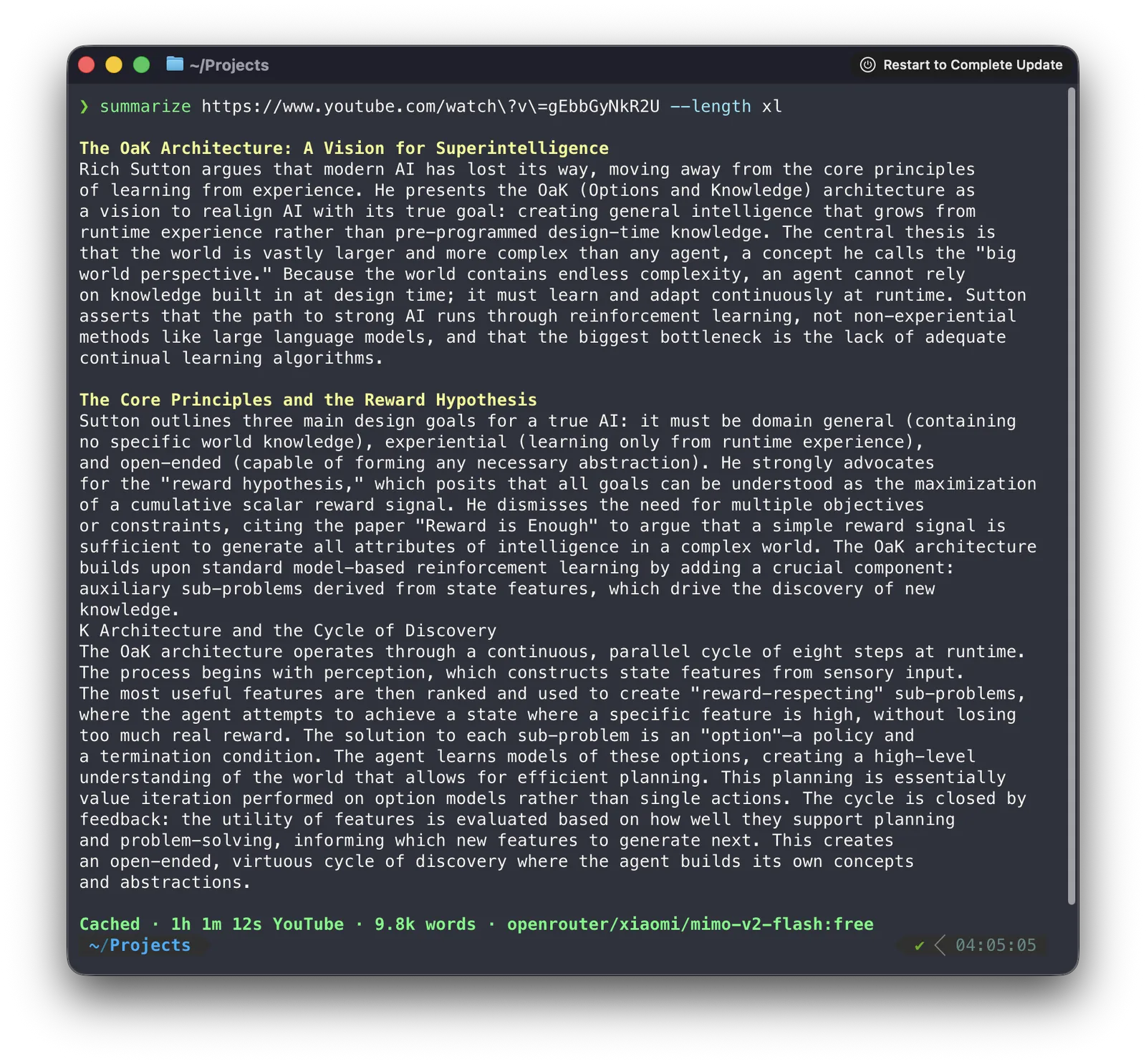
Requires Node 24+.
Optional Local Dependencies
Install these if you want media-heavy features:
ffmpeg: optional native accelerator with broader codec support; bundled WebAssembly is the fallbackyt-dlp: required for YouTube slide extraction and some remote media flowstesseract: optional OCR for--slides-ocr
macOS (Homebrew):
brew install ffmpeg yt-dlp
brew install tesseract # optional, for --slides-ocr
If native ffmpeg/ffprobe are unavailable, Summarize uses the bundled WebAssembly build. Native ffmpeg remains recommended for speed and broader codec/filter support.
Quickstart
summarize "https://example.com"
Inspect the effective model setup:
summarize status
summarize status --verbose
summarize status --probe
summarize status --json
Inputs
URLs or local paths:
summarize "/path/to/file.pdf" --model google/gemini-3-flash
summarize "https://example.com/report.pdf" --model google/gemini-3-flash
summarize "/path/to/audio.mp3"
summarize "/path/to/video.mp4"
Stdin (pipe content using -):
echo "content" | summarize -
pbpaste | summarize -
YouTube (supports youtube.com and youtu.be):
summarize "https://youtu.be/dQw4w9WgXcQ" --youtube auto
Podcast RSS (transcribes latest enclosure):
summarize "https://feeds.npr.org/500005/podcast.xml"
Apple Podcasts episode page:
summarize "https://podcasts.apple.com/us/podcast/2424-jelly-roll/id360084272?i=1000740717432"
Spotify episode page (best-effort; may fail for exclusives):
summarize "https://open.spotify.com/episode/5auotqWAXhhKyb9ymCuBJY"
HLS playlist:
summarize "https://example.com/master.m3u8"
Output Length
--length controls how much output we ask for (guideline), not a hard cap. The built-in default is long.
Set a default in ~/.summarize/config.json with output.length.
- Presets:
short|medium|long|xl|xxl - Character targets:
1500,20k,20000 - Optional hard cap:
--max-output-tokens <count>(e.g.2000,2k) - Short content: when extracted content is shorter than the requested length, the CLI returns the content as-is. Override with
--force-summaryto always run the LLM. - Minimums:
--lengthnumeric values must be >= 10 chars;--max-output-tokensmust be >= 16. - Preset targets (source of truth:
packages/core/src/prompts/summary-lengths.ts):- short: target ~900 chars (range 600-1,200)
- medium: target ~1,800 chars (range 1,200-2,500)
- long: target ~4,200 chars (range 2,500-6,000)
- xl: target ~9,000 chars (range 6,000-14,000)
- xxl: target ~17,000 chars (range 14,000-22,000)
Supported File Types
Best effort and provider-dependent. These usually work well:
text/*and common structured text (.txt,.md,.json,.yaml,.xml, ...)- PDFs:
application/pdf(provider support varies; Google is the most reliable here) - Images:
image/jpeg,image/png,image/webp,image/gif - Audio/Video:
audio/*,video/*(local audio/video files automatically transcribed, when supported by the model)
Notes:
- If a provider rejects a media type, the CLI fails fast with a friendly message.
- xAI models do not support attaching generic files (like PDFs) via the AI SDK; use Google/OpenAI/Anthropic for those.
Model IDs
Use gateway-style ids: <provider>/<model>.
Examples:
openai/gpt-5.4openai/gpt-5.4-miniopenai/gpt-5.4-nanoopenai/gpt-5-miniopenai/gpt-5-nanogithub-copilot/gpt-5.4anthropic/claude-sonnet-4-5xai/grok-4-fast-non-reasoninggoogle/gemini-3-flashzai/glm-4.7minimax/MiniMax-M3openrouter/openai/gpt-5-mini(force OpenRouter)
Note: some models/providers do not support streaming or certain file media types. When that happens, the CLI prints a friendly error (or auto-disables streaming for that model when supported by the provider).
OpenAI Fast Mode and Thinking
Fast mode is a request option, not a model id:
summarize "https://example.com" --model openai/gpt-5.5 --fast --thinking medium
summarize "https://example.com" --model openai/gpt-5.4 --service-tier fast --thinking low
--fastis shorthand for--service-tier fast.--service-tier default|fast|priority|flexcontrols OpenAI service tier.fastis the summarize/Codex-facing spelling and is sent to OpenAI asservice_tier="priority".--thinking none|low|medium|high|xhighcontrols OpenAI reasoning effort. Aliases:off→none,min→low,mid/med→medium,x-high/extra-high→xhigh.--service-tier defaultclears a configured tier for one run.
Limits
- Text inputs over 10 MB are rejected before tokenization.
- Text prompts are preflighted against the model input limit (LiteLLM catalog), using a GPT tokenizer.
Common Flags
summarize <input> [flags]
--model <provider/model>: which model to use (defaults toauto)--model auto: automatic model selection + fallback (default)--model <name>: use a built-in or config-defined preset--timeout <duration>:30s,2m,5000ms(default2m)--retries <count>: LLM retry attempts after timeouts or transient API failures (default1)--length short|medium|long|xl|xxl|s|m|l|<chars>--language, --lang <language>: output language (auto= match source)--max-output-tokens <count>: hard cap for LLM output tokens--cli [provider]: use a CLI provider (--model cli/<provider>). Supportsclaude,gemini,codex,agent,openclaw,opencode,copilot,agy,pi. If omitted, uses auto selection with CLI enabled.--stream auto|on|off: stream LLM output (auto= TTY only; disabled in--jsonmode)--plain: keep raw output (no ANSI/OSC Markdown rendering)--no-color: disable ANSI colors--theme <name>: CLI theme (aurora,ember,moss,mono)--format md|text: website/file content format (defaulttext)--markdown-mode off|auto|llm|readability: HTML -> Markdown mode (defaultreadability)--preprocess off|auto|always: controlsuvx markitdownusage (defaultauto)--extract: print extracted content and exit (URLs, YouTube/direct media, local audio/video, and local PDFs; stdin-is not supported)--slides: extract slides for YouTube, direct video URLs, or local video files and render them inline in the summary narrative--no-slides: disable slide extraction enabled in~/.summarize/config.jsonfor one run--slides-ocr: run OCR on extracted slides (requirestesseract)--no-slides-ocr: disable slide OCR enabled in~/.summarize/config.jsonfor one run--slides-dir <dir>: base output dir for slide images (default./slides)--slides-scene-threshold <value>: scene detection threshold (0.1-1.0)--slides-max <count>: maximum slides to extract (default6)--slides-min-duration <seconds>: minimum seconds between slides--json: machine-readable output with diagnostics, prompt,metrics, and optional summary--verbose: debug/diagnostics on stderr--metrics off|on|detailed: metrics output (defaulton)
Coding CLIs
Summarize can use common coding CLIs as local model backends:
codex->--cli codex/--model cli/codex/<model>claude->--cli claude/--model cli/claude/<model>gemini->--cli gemini/--model cli/gemini/<model>agent(Cursor Agent CLI) ->--cli agent/--model cli/agent/<model>openclaw->--cli openclaw/--model cli/openclaw/<model>or--model openclaw/<model>opencode->--cli opencode/--model cli/opencode/<model>(--model cli/opencodeuses the OpenCode runtime default)copilot(GitHub Copilot CLI) ->--cli copilot/--model cli/copilot/<model>(--model cli/copilotuses the Copilot runtime default)agy(Antigravity CLI) ->--cli agy/--model cli/agy(uses agy's active session model; per-call model selection is not supported by agy print mode)pi(Pi Coding Agent) ->--cli pi/--model cli/pior--model cli/pi/<model>
Built-in preset:
--model codex-fastruns Codex with GPT-5.5 Fast mode and requirescodex login.
Requirements:
- Binary installed and on
PATH(or set corresponding path environment variable) - Provider authenticated
Auto Model Ordering
--model auto builds candidate attempts from built-in rules (or your model.rules overrides). CLI attempts are prepended when cli.enabled is set or implicit auto selection is active.
Default fallback behavior: only when no API keys are configured, order claude, gemini, codex, agent, openclaw, opencode, copilot, and remember/prioritize last successful provider (~/.summarize/cli-state.json). Antigravity and pi are opt-in unless you add them to cli.autoFallback.order.
Website Extraction (Firecrawl + Markdown)
Non-YouTube URLs go through a fetch -> extract pipeline. When direct fetch/extraction is blocked or too thin, --firecrawl auto can fall back to Firecrawl (if configured).
--firecrawl off|auto|always(defaultauto)--extract --format md|text(defaulttext; if--formatis omitted,--extractdefaults tomdfor non-YouTube URLs)--markdown-mode off|auto|llm|readability(defaultreadability)
YouTube Transcripts
--youtube auto tries best-effort web transcript endpoints first. When captions are not available, it falls back to:
- yt-dlp + Whisper (if
yt-dlpis available) - Android VR direct audio + configured transcription chain
- Apify (if
APIFY_API_TOKENis set)
Speaker-labelled transcripts for YouTube, local audio/video, and direct media URLs are available with --diarize.
Slide Extraction
Extract slide screenshots (scene detection via ffmpeg) and optional OCR. Requires yt-dlp for YouTube video download/stream resolution, and tesseract only when using --slides-ocr.
summarize "https://www.youtube.com/watch?v=..." --slides
summarize "https://www.youtube.com/watch?v=..." --slides --slides-ocr
summarize "/path/to/video.webm" --slides
Outputs are written under ./slides/<sourceId>/ (or --slides-dir). OCR results are included in JSON output and stored in slides.json.
Media Transcription (Whisper)
Local audio/video files are transcribed first, then summarized. --video-mode transcript forces direct media URLs through Whisper first. Auto mode tries Groq first when configured, then local ONNX/whisper.cpp, then cloud fallbacks. Configure local ONNX/whisper.cpp for local-only transcription; otherwise set one of GROQ_API_KEY, ASSEMBLYAI_API_KEY, GEMINI_API_KEY, OPENAI_API_KEY, FAL_KEY, or DEEPGRAM_API_KEY.
Local ONNX Transcription (Parakeet/Canary)
Summarize can use NVIDIA Parakeet/Canary ONNX models via a local CLI you provide. Auto selection tries Groq first when configured, then ONNX before whisper.cpp and the remaining cloud fallbacks.
- Setup helper:
summarize transcriber setup - Auto selection: set
SUMMARIZE_ONNX_PARAKEET_CMDorSUMMARIZE_ONNX_CANARY_CMD - Select the local transcription stage:
--transcriber parakeet|canary|whisper|auto
Verified Podcast Services (2026-07-17)
- Apple Podcasts
- Spotify
- Xiaoyuzhou
- Amazon Music / Audible podcast pages
- Podbean
- Podchaser
- RSS feeds (Podcasting 2.0 transcripts when available)
- Embedded YouTube podcast pages (e.g. JREPodcast)
Translation Paths
--language/--lang controls the output language of the summary (and other LLM-generated text). Default is auto. When the input is audio/video, the CLI needs a transcript first from existing transcripts (YouTube captions, Podcasting 2.0 RSS) or Whisper transcription fallback.
Configuration
Single config location: ~/.summarize/config.json
Run summarize status to inspect the effective default model, configured presets, and model providers.
Supported keys:
{
  "model": { "id": "openai/gpt-5-mini" },
  "env": { "OPENAI_API_KEY": "sk-..." },
  "output": { "length": "long" },
  "ui": { "theme": "ember" }
}
Also supported:
model: { "mode": "auto" }(automatic model selection + fallback)model.rules(customize candidates / ordering)models(define presets selectable via--model <preset>)env(generic env var defaults; process env still wins)apiKeys(legacy shortcut, mapped to env names; preferenvfor new configs)output.length(default:long)cache.media(media download cache: TTL 7 days, 2048 MB cap by default)media.videoMode: "auto"|"transcript"|"understand"media.embeddedVideo: "auto"|"off"|"prefer"|"both"(defaultauto)slides.enabled/slides.max/slides.ocr/slides.dir(defaults for--slides)ui.theme: "aurora"|"ember"|"moss"|"mono"openai.useChatCompletions: trueopenai.serviceTier: "fast"|"priority"|"flex"openai.thinking/openai.reasoningEffort: "none"|"low"|"medium"|"high"|"xhigh"openai.textVerbosity: "low"|"medium"|"high"
Note: the config is parsed leniently (JSON5), but comments are not allowed. Unknown keys are ignored.
Precedence:
--modelSUMMARIZE_MODEL~/.summarize/config.json- default (
auto)
Environment Variables
Set the key matching your chosen --model:
OPENAI_API_KEY(foropenai/...)NVIDIA_API_KEY(fornvidia/...)MINIMAX_API_KEY(forminimax/...)ANTHROPIC_API_KEY(foranthropic/...)XAI_API_KEY(forxai/...)Z_AI_API_KEY(forzai/...; supportsZAI_API_KEYalias)GEMINI_API_KEY(forgoogle/...) — also acceptsGOOGLE_GENERATIVE_AI_API_KEYandGOOGLE_API_KEY
OpenAI-compatible chat completions toggle:
OPENAI_USE_CHAT_COMPLETIONS=1
UI theme:
SUMMARIZE_THEME=aurora|ember|moss|monoSUMMARIZE_TRUECOLOR=1(force 24-bit ANSI)SUMMARIZE_NO_TRUECOLOR=1(disable 24-bit ANSI)
OpenRouter (OpenAI-compatible):
- Set
OPENROUTER_API_KEY=... - Prefer forcing OpenRouter per model id:
--model openrouter/<author>/<slug> - Built-in preset:
--model free(uses a default set of OpenRouter:freemodels)
NVIDIA API Catalog:
- Set
NVIDIA_API_KEY=... - Optional:
NVIDIA_BASE_URL=https://integrate.api.nvidia.com/v1 - Credits: API Catalog trial starts with 1000 free API credits on signup
Z.AI (OpenAI-compatible):
Z_AI_API_KEY=...(orZAI_API_KEY=...)- Optional base URL override:
Z_AI_BASE_URL=...
MiniMax (OpenAI-compatible):
- Set
MINIMAX_API_KEY=... - Optional base URL override:
MINIMAX_BASE_URL=...(defaulthttps://api.minimax.io/v1)
Optional services:
FIRECRAWL_API_KEY(website extraction fallback)YT_DLP_PATH(path to yt-dlp binary)GROQ_API_KEY(Groq Whisper transcription)ASSEMBLYAI_API_KEY(AssemblyAI transcription)ELEVENLABS_API_KEY(ElevenLabs Scribe v2 speaker diarization)GEMINI_API_KEY/GOOGLE_GENERATIVE_AI_API_KEY/GOOGLE_API_KEY(Gemini transcription)SUMMARIZE_GEMINI_TRANSCRIPTION_MODEL(optional Gemini model override; defaultgemini-2.5-flash)OPENAI_API_KEY/OPENAI_WHISPER_BASE_URL(OpenAI Whisper transcription)FAL_KEY(FAL AI API key)DEEPGRAM_API_KEY(Deepgram API key)SUMMARIZE_DEEPGRAM_TRANSCRIPTION_MODEL(optional Deepgram model override; defaultnova-3)APIFY_API_TOKEN(YouTube transcript fallback)
summarize refresh-free
Regenerates the free preset (models.free in ~/.summarize/config.json) by:
- Fetching OpenRouter
/models, filtering:free - Skipping models that look very small (<27B by default)
- Testing which ones return non-empty text
- Picking a mix of smart-ish and fast models
- Refining timings and writing the sorted list back
If --model free stops working, run:
summarize refresh-free
Flags:
--runs 2(default): extra timing runs per selected model--smart 3(default): how many smart-first picks (rest filled by fastest)--min-params 27b(default): ignore models with inferred size smaller than N billion parameters--max-age-days 180(default): ignore models older than N days (set 0 to disable)--set-default: also sets"model": "free"in~/.summarize/config.json
Model Limits
The CLI uses the LiteLLM model catalog for model limits (like max output tokens):
- Downloaded from:
https://raw.githubusercontent.com/BerriAI/litellm/main/model_prices_and_context_window.json - Cached at:
~/.summarize/cache/
Additional Documentation
- CLI providers and config
- Auto model rules
- Website extraction
- YouTube handling
- Media pipeline
- Config schema and precedence
Troubleshooting
- "Receiving end does not exist": Chrome did not inject the content script yet. Extension details -> Site access -> On all sites (or allow this domain). Reload the tab once.
- "Failed to fetch" / daemon unreachable:
summarize daemon status- For a non-default port, confirm Options → Runtime → Daemon → Port matches the daemon configuration.
- Logs:
~/.summarize/logs/daemon.err.log
License: MIT