
guizang-social-card-skill
Create platform-ready social media cards for multiple channels.

Suggested prompts
About this skill
Guizang Social Card Skill · Xiaohongshu Carousels / WeChat Cover Pairs
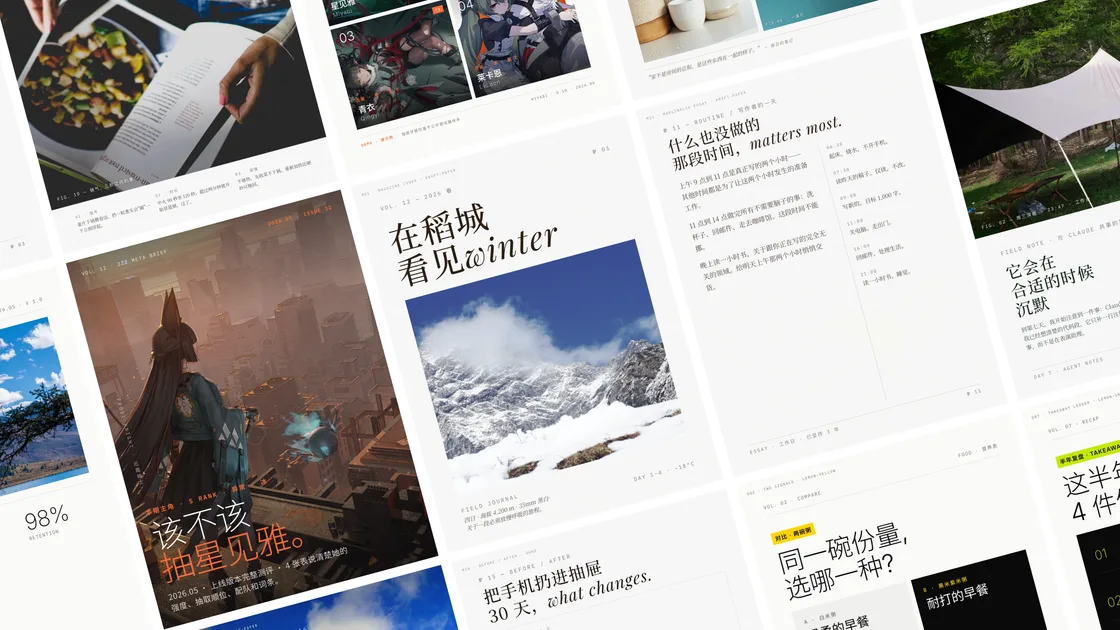
An agent skill for Claude Code, Codex, and similar coding-agent environments. It generates Xiaohongshu / Rednote carousel images, Live Photo motion cards, and WeChat 21:9 + 1:1 cover pairs from articles, copy, screenshots, product notes, subtitles, photos, or user-supplied videos.
Two visual systems share one workflow:
- Editorial. Restrained layouts in the spirit of Monocle / Kinfolk / Cereal. Best for storytelling, lifestyle, travel, reading, film, and personal observation.
- Swiss International. Grid-first, single anchor color, sharp hairlines, extreme type contrast. Best for product reviews, data, frameworks, tutorials, and AI tools.
Sister project to guizang-ppt-skill. Shared visual language, separate maintenance. PPT solves "horizontal swipe talks"; this one solves "static feed images."
30-second start
npx skills add https://github.com/op7418/guizang-social-card-skill --skill guizang-social-card-skill
Or paste this to an AI agent with shell access:
Install guizang-social-card-skill for me. Clone https://github.com/op7418/guizang-social-card-skill into ~/.claude/skills/guizang-social-card-skill, then verify that SKILL.md, assets/, and references/ exist.
If you already installed it, update with:
Update guizang-social-card-skill for me. Go to ~/.claude/skills/guizang-social-card-skill, run git pull, then tell me the latest commit.
Then ask your agent:
Make me a Swiss-style Xiaohongshu carousel from this article, 5 cards, IKB blue.
Other useful prompts:
Make me a 3:4 Xiaohongshu set from this product review, with editorial-style titles.
Turn this article into a WeChat cover pair: 21:9 hero + 1:1 share card, visually consistent.
I have 3 camping photos — make me an image-led Xiaohongshu carousel.
Turn this game guide copy into a Xiaohongshu set; pull some game art from Wallhaven.
I have a coffee video — make it a 5-second Xiaohongshu Live Photo card with text in a quiet zone.
Turn these three game clips into a triple Live Photo collage with Swiss-style guide copy.
What you get
- 🖋 Two visual systems: Editorial for atmosphere and narrative, Swiss for facts and structure, sharing one workflow
- 📐 3 canvas sizes:
.poster.xhs1080×1440 (Xiaohongshu 3:4),.poster.wide2100×900 (WeChat 21:9),.poster.square1080×1080 (WeChat 1:1) - 🎬 Live Photo motion cards: single video, two-grid, three-grid, four-grid, triple collage, and low-cost long-video diagnosis;
5sfor Xiaohongshu,3sfor WeChat Official Account articles - 🧩 28 layout skeletons: 16 Editorial (
M01-M16, including Image-Led Cover, Pipeline, Before/After) + 12 Swiss (S01-S12, including KPI Tower, H-Bar Chart, Matrix + Hero) - 🎨 10 theme presets: 6 Editorial (Ink Classic, Indigo Porcelain, Forest Ink, Kraft Paper, Dune, Midnight Ink dark) + 4 Swiss anchor colors (IKB Klein Blue, Lemon, Lemon Green, Safety Orange)
- 🖼 Image sourcing workflow: user images first; otherwise waterfall through Unsplash → Pexels → Flickr CC → Wallhaven → direct search, downloaded locally with auto-generated
SOURCES.md - 🌫 WebGL ink-flow background: editorial hero pages can ship a live ink animation; can be disabled for low-power devices or screenshot mode
- 🪧 Text-on-image + subject safety: full-bleed images require quiet-zone and subject mapping first; add only localized tint when needed, not a default full-canvas mask
- 🧰 Screenshot beautification assets: 9 real-texture WebP backgrounds (5 Editorial / 4 Swiss), paired with
.frame-shot/.device-browser/.device-phoneutilities - 🗺 Map component: MapLibre + OSM real tiles, multi-pin + connectors, made for travel guides
- ✅ Validator:
validate-social-deck.mjsauto-detects overflow, type cap violations, 4-band density gaps, and footer collisions - 📄 Single-file HTML + Playwright rendering: no frontend build pipeline;
node render.mjsoutputs PNG directly
Live Photo effects and layouts
In this skill, Live Photo means "put the user's video into a social-card layout." It is not random stock-video sourcing and not long-form video editing. First make the first frame work as a still card; then let 3s/5s of motion add evidence.
| Layout | Effect | Best for |
|---|---|---|
| Single-video motion card | One video cropped to full-canvas 3:4; when text is needed, use one short headline only and follow M16 Image-Led Cover / image-overlay rules for subject safety, quiet zones, type, and localized tint |
Coffee, travel, fitness moves, product states, game moments |
| Two-grid / three-grid / four-grid puzzle | Multiple video wells inside one Live Photo, usually with no added text so strong footage leads | Travel scenery, fashion picks, room details, food process, workout actions |
| Triple Live Photo collage | Three short clips in parallel, increasing information density inside the short duration; add at most one real scene headline when needed | Guide steps, before/after, multi-angle demos, model test results |
| Long-video diagnosis | Sparse frames / contact sheet for long source videos, then recommend trimming, speed-up, splitting, or asking the user for an exact range | 1-3 minute user videos without a chosen moment |
| Publishing package | Debug JPG + MOV plus an iPhone-friendly .pvt package |
Xiaohongshu and WeChat Official Account article Live Photos |
Judge the information budget first: WeChat 3s is best for one action point or one state change; Xiaohongshu 5s can hold one compact process; triple collages are for three parallel results, not a long sequential story.
Live Photo generation guide
- Confirm platform and assets: user-supplied video is the default input; sourced public video is only for demo / promo testing. Confirm Xiaohongshu, WeChat Official Account article, or local test.
- Judge information density: ask what the viewer can understand in
3s/5s. If it needs narration, audio, or a full tutorial, do not force it into Live Photo. - Choose the structure: one strong clip becomes a single-video card; multiple strong clips become two-grid / three-grid / four-grid; three parallel results become a triple collage; long videos get low-cost diagnosis first.
- Check the still card first: the first frame must read as a polished social card. Check crop, subject, text placement, platform safe area, and never turn production requirements into visible audience copy.
- Generate motion assets: output preview video, key JPG, MOV, and
.pvtinside the task folder; do not write generated files into the skill root. - Deliver with publishing notes: Xiaohongshu uses
5s; WeChat Official Account article Live Photo should stay at3s; usually transfer the.pvtas one package to iPhone and publish from the matching mobile app, because desktop/web paths generally cannot publish Live Photo.
Useful prompts:
Turn this coffee video into a 5-second Xiaohongshu Live Photo. Use only one headline and avoid the cup and hand.
These four travel clips are strong. Make a four-grid Live Photo with no added text.
Make a contact sheet from this 2-minute game video and recommend the best 5 seconds for a guide-style Live Photo.
Fits / Doesn't fit
✅ Fits: Xiaohongshu carousels / Live Photo motion cards / WeChat cover pairs / Moments covers / Channels covers / article visuals / tutorial pages / data recaps / travel guides / product reviews / screenshot explainers
❌ Doesn't fit: Horizontal swipe decks (use guizang-ppt-skill) / long-form video editing / pure photo retouching / plain-text editing without layout
11 Xiaohongshu categories
Tiered by "circle of competence" — see references/category-cookbook.md:
End-to-end strong (copy / structure / images all in scope):
- Travel, career, recommendations (after specifying a sub-genre)
Copy and structure strong, images depend on user or sourced art:
- Gaming, film, food (recipe-oriented), makeup (tutorial-oriented), fitness, home, fashion (curated picks)
Out of scope, declared upfront (won't force-fit):
- OOTD live shots / dreamcore / film-emulation grading / real skin-test makeup — anything heavily dependent on photography or post-production
Common scenarios
| Task | Recommended flow |
|---|---|
| Long article → Xiaohongshu carousel | Extract core takeaways; Editorial for narrative pacing, Swiss for data breakdowns |
| Product review / tool wrap-up | Swiss + IKB blue, prefer S09 KPI Tower / S10 H-Bar Chart |
| Travel / lifestyle | Editorial + Midnight Ink or Dune, M16 Image-Led Cover for full-bleed hero |
| WeChat cover pair | Render the same content twice: .poster.wide 21:9 + .poster.square 1:1, visually consistent |
| Screenshot tutorial / tool walkthrough | .frame-shot + .device-browser, prefer Swiss grid base |
| Game guide / film recap | Editorial + Midnight Ink, pull game art from Wallhaven for full-bleed hero |
| User video → Live Photo | Judge the 3s/5s information budget first, then choose single video / puzzle / triple collage / long-video diagnosis |
| Data recap / year in review | Swiss + Lemon or Safety Orange, matrix + ledger combo |
Why single-file HTML to PNG
- Agent-friendly: HTML + CSS is text — agents can write, read, edit, and validate directly
- Layout precision: CSS Grid + strict type / margin / grid rules far exceed Markdown's layout reach
- Open image sourcing: hook into Unsplash / Pexels / Wallhaven / Mapbox / OSM / any web resource
- Verifiable quality:
validate-social-deck.mjsruns Playwright DOM measurement, not guesswork - Simple delivery:
output/*.pngships directly — no deploys, no export tools - Practical motion-card delivery: the Live Photo branch exports
JPG + MOV + .pvt, with Xiaohongshu / WeChat duration limits and mobile publishing paths documented
Platform support
| Platform | Status | Notes |
|---|---|---|
| Claude Code | Supported | Native Skill workflow, ideal for generating + iterating cards |
| Codex | Supported | Good for long-form card generation, sourcing images, visual QA |
| Cursor / other local agents | Works | Requires filesystem read/write + shell execution |
| Plain chatbot | Not recommended | Without filesystem and rendering pipeline, can't reliably ship images |
Install
Option 1: One-line install (recommended)
npx skills add https://github.com/op7418/guizang-social-card-skill --skill guizang-social-card-skill
Option 2: Paste this to an AI
Install the
guizang-social-card-skillClaude Code skill for me. Steps:
- Make sure
~/.claude/skills/exists (create if not)- Run
git clone https://github.com/op7418/guizang-social-card-skill.git ~/.claude/skills/guizang-social-card-skill- Verify:
ls ~/.claude/skills/guizang-social-card-skill/should showSKILL.md,assets/,references/- Tell me when done. Later, saying things like "make me a Xiaohongshu carousel" will trigger this skill.
Paste the block above into Claude Code / Cursor / any AI agent with shell access.
Option 3: Manual CLI
git clone https://github.com/op7418/guizang-social-card-skill.git ~/.claude/skills/guizang-social-card-skill
How to trigger it
Once installed, Claude Code auto-detects the skill. Trigger phrases:
- "Make me a Xiaohongshu / Rednote carousel"
- "Make me Rednote cards"
- "Make a WeChat 21:9 hero + 1:1 share card"
- "Generate social cards / magazine-style social cards"
- "Turn this article into a tutorial carousel"
- "Make a Swiss-style Xiaohongshu review / IKB-style cards"
- "Turn this video into a Xiaohongshu Live Photo / triple Live Photo collage"
- "Make a 3-second Live Photo for a WeChat Official Account article"
Workflow
The skill is a structured workflow. The agent walks through 7 steps:
- Intake — capture 4 things: target platform / style / source content / user images. When no images are available, present A/B/C once (shoot your own / AI generate / source online); don't re-pitch
- Style & Theme — pick Editorial or Swiss, then pick one of 10 theme presets. Custom hex values are not allowed
- Layout Selection — pick / paste / adapt copy from the 28 layout skeletons. 16 Editorial / 12 Swiss
- Asset Prep — source images (Unsplash / Pexels / Flickr CC / Wallhaven / direct search), download locally + write
SOURCES.md; ask whether to credit sources - Compose & Render — copy seed template → replace `` →
node render.mjs - Deliver & Review — show PNGs first, ask "look at them yourself, or want me to run the validator?" — does not auto-validate
- Iterate — apply user feedback, tweak inline styles or swap layouts / images, re-render
Live Photo requests branch inside Step 5: judge the 3s/5s information budget, inspect the first frame or a sparse contact sheet for crop safety, then export JPG + MOV + .pvt. Delivery notes include platform limits and publishing paths: 5s for Xiaohongshu, 3s for WeChat Official Account articles, usually transferred to iPhone and published from the matching mobile app.
Full spec in SKILL.md. Deep details in the matching references/*.md.
Validator
node validate-social-deck.mjs path/to/task-dir
9 rules, based on Playwright real-render measurement, not static scanning:
- R1 Overflow — any section overflowing
.posterfails immediately and reports a pixel-based fix tier - R2 Footer Collision — content pressing into the bottom footer / page-number
- R3 Swiss Bold Display — Swiss large titles violating "bigger means thinner"
- R4 Min Readable Font — body, captions, labels, and metadata below mobile-readable floors
- R5 4-Band Density — 1440-tall canvas split into 4 horizontal bands; each must hold content or have a stated whitespace reason
- R6 H-XL Line Cap —
.h-xl/.h-display/.h-statementline counts exceeding board budgets - R7 Figure Margin Drift — default browser
<figure>margins causing layout drift - R8 Visual Bounds — true visible top/bottom bounds, visual overflow, and bottom whitespace
- R9 Title Gap — display title too close to the next content block
SKILL.md Step 7 explicitly states the validator does not auto-run — wait for the user to look at the images first, saving tens of seconds per round.
Theme presets
Pick from references/theme-presets.md. Custom hex values are not allowed — protecting the aesthetic matters more than freedom of choice.
Editorial (6)
| Theme | Tones | Best for |
|---|---|---|
| 🖋 Ink Classic | #0a0a0b / #f1efea |
General default, commercial topics, when in doubt |
| 🌊 Indigo Porcelain | #0a1f3d / #f1f3f5 |
Tech, research, AI, technical writing |
| 🌿 Forest Ink | #1a2e1f / #f5f1e8 |
Nature, sustainability, outdoors, non-fiction |
| 🍂 Kraft Paper | #2a1e13 / #eedfc7 |
Nostalgia, humanities, reading, literature |
| 🌙 Dune | #1f1a14 / #f0e6d2 |
Art, design, creative, fashion |
| ⚫ Midnight Ink | #0e0d0c / #ece2cf / #d4a04a |
Game key art / night scenes / cinematic covers / Black Myth · Elden Ring-style dark themes |
Swiss (4)
| Theme | Anchor | Best for |
|---|---|---|
| 🔵 IKB Klein Blue | #002FA7 |
General default, commercial launches, AI products, frameworks |
| 🟡 Lemon | #FFD500 |
Youth, sports, retail, consumer, Y2K |
| 🟢 Lemon Green | #C5E803 |
Eco, health, Gen Z, green brands |
| 🟠 Safety Orange | #FF6B35 |
Alerts, news, industrial, energetic themes |
To switch themes, just replace the <section class="poster" data-theme="..."> attribute on the seed template; all CSS resolves through var(--...).
Directory
guizang-social-card-skill/
├── SKILL.md                              ← Main skill file: 7-step workflow
├── README.md                             ← Chinese README
├── README.en.md                          ← This file
├── HANDOFF.md                            ← Handoff doc: facts + version history
├── PRODUCT.md                            ← Product doc: thinking + decisions + roadmap
├── validate-social-deck.mjs              ← Playwright layout validator
├── scripts/                              ← Live Photo packaging / contact sheet / doc-test scripts
├── assets/
│   ├── template-editorial-card.html      ← Editorial seed (6 themes / 3 canvases)
│   ├── template-swiss-card.html          ← Swiss seed (4 accents / 3 canvases)
│   ├── magazine-bg-webgl.js              ← WebGL ink-flow background
│   └── screenshot-backgrounds/           ← 9 screenshot stage backgrounds (WebP)
│       ├── style-a/                      ←   5 Editorial
│       └── style-b/                      ←   4 Swiss
└── references/
    ├── platform-specs.md                 ← Platform × resolution × naming
    ├── style-system.md                   ← Hard rules and anti-patterns for both styles
    ├── theme-presets.md                  ← All 10 palettes in detail
    ├── layout-recipes.md                 ← 28 layout skeletons (M01-M16 + S01-S12)
    ├── components.md                     ← Type / cards / spacing / icons
    ├── background-systems.md             ← Ink flow / grid / paper layers
    ├── portrait-fill.md                  ← Whitespace strategy for the 3:4 board
    ├── content-planning.md               ← Hooks / page splits / copy compression
    ├── category-cookbook.md              ← 11 Xiaohongshu category routing table
    ├── image-overlay.md                  ← Text-on-image + subject safety rules
    ├── screenshot-treatment.md           ← `.frame-shot` utilities + screenshot beautification
    ├── map-component.md                  ← `.map-block` MapLibre map
    ├── title-shortener.md                ← Short-title strategy for the 1:1 cover
    ├── production-workflow.md            ← Playwright render pipeline
    ├── live-photo-production.md          ← Live Photo production / puzzle / long-video / publishing rules
    └── qa-checklist.md                   ← Quality checklist
Core design principles
- Restraint over loudness — restrained palettes stand out in a saturated feed
- Structure over decoration — type / contrast / grid carries the hierarchy, not shadows or cards
- Layouts over freedom — pick first, adapt later; do not invent pages outside the 28 skeletons
- User images first — at intake, present A/B/C once; do not re-pitch shooting their own
- Select and avoid first — full-bleed images need a quiet zone; text drop zones must clear the subject (faces / products / text-dense regions); add localized tint only when needed
- Bigger means thinner — Swiss
.h-xlsize goes up → weight must come down. Editorial follows the same rule - No auto-validation — let the user look first, then ask before validating; saves tens of seconds per round
- A skill is a product, not a prompt — has PRODUCT.md, version numbers, CHANGELOG, capability boundaries
- Local tests stay out of git — all demos / smoke tests live under
local-tests/, gitignored - Treat video as a card first — a Live Photo first frame must work as a good social card; visible copy should describe the real scene, not production terminology
Visual references
- Monocle / Kinfolk / Cereal magazine layouts and letter spacing
- Massimo Vignelli / Helvetica Forever / Swiss International Typographic Style grid systems
- Apartamento / The Gentlewoman image-to-text ratios and human portraiture
- Restrained-wins-the-feed samples from Xiaohongshu / Rednote
- Guizang's social card practice
FAQ
Can I batch-export images?
Yes. A task directory's index.html can hold multiple .poster sections; node render.mjs screenshots each one. A 3-9 card Xiaohongshu set is the common case.
Why are custom colors disallowed? Same reason as the PPT skill — the skill's core value is stable output. Free color picking breaks visual cohesion. Pick from the 10 presets only.
Can I use other models for image generation? Yes. Image generation itself is out of scope. SKILL.md Step 4 spells out the sourcing protocol: user images → AI-generated → web sources. AI generation depends on whichever model your agent connects to.
Does it support Live Photo?
Yes. Plan for 5s on Xiaohongshu and 3s inside WeChat Official Account articles. It supports single video, two-grid, three-grid, four-grid, triple collage, and sparse long-video diagnosis. Publishing usually requires the mobile path; desktop upload flows generally cannot recognize .pvt as a publishable Live Photo.
Codex output drifts off-spec — what do I do?
Since v0.12 the rule "seed templates and components.md table stay in sync" is a hard constraint. If a violation slips through, it's almost always seed-template defaults diverging from references/style-system.md — open an issue.
How do I update?
Re-run the install command, or git pull in your local skill directory.
Does it support English content? Yes. Editorial's Playfair Display + Noto Serif and Swiss's Inter + Helvetica all cover Chinese and English. Layout skeletons are language-agnostic.