
baoyu-design
Bring the power of Claude Design to your local development environment to generate high-quality UI mockups, prototypes, and slide decks without the web interface.

Suggested prompts
About this skill
baoyu-design
Run Claude Design on your own local agent — Cursor, Claude Code, Claude Desktop, or any file‑capable coding agent. It packages Claude Design as a portable Agent Skill, producing polished UI mockups, interactive prototypes, wireframes, landing pages, dashboards, mobile apps, and slide decks — all as self‑contained HTML. No website, no separate subscription, no upload step. The agent on your machine does the work, and every artifact stays in your repo.
When to use it
- You want to generate high‑fidelity designs, prototypes, wireframes, landing pages, dashboards, mobile apps, or slide decks directly in your editor.
- You prefer to work offline or keep everything in your repo, without relying on claude.ai/design.
- You need to iterate visually by pointing at elements in a live preview and having the agent edit the source.
- You have existing design context (screenshots, Figma files, GitHub repos, or HTML/CSS) to feed into the design process.
Screenshots
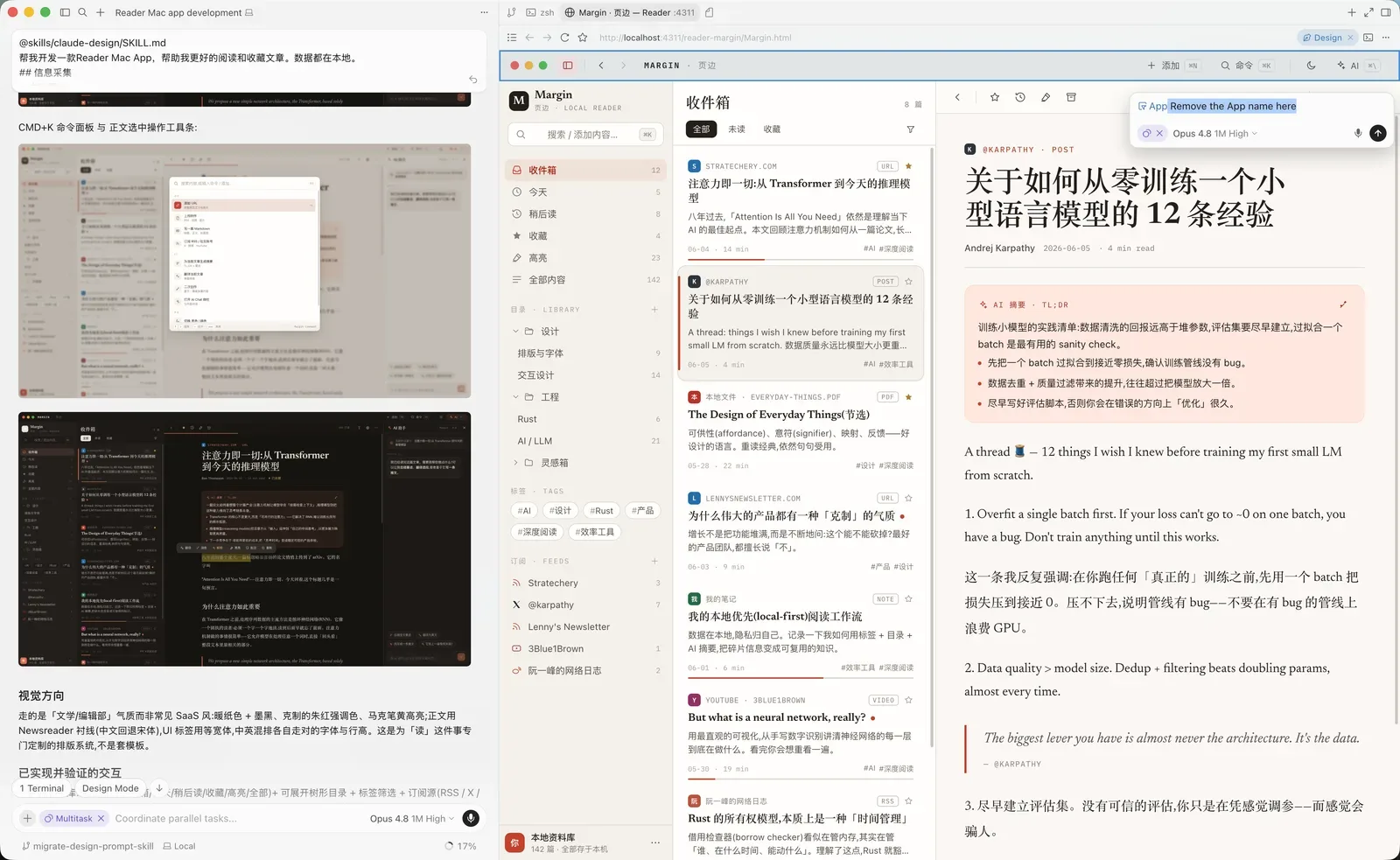
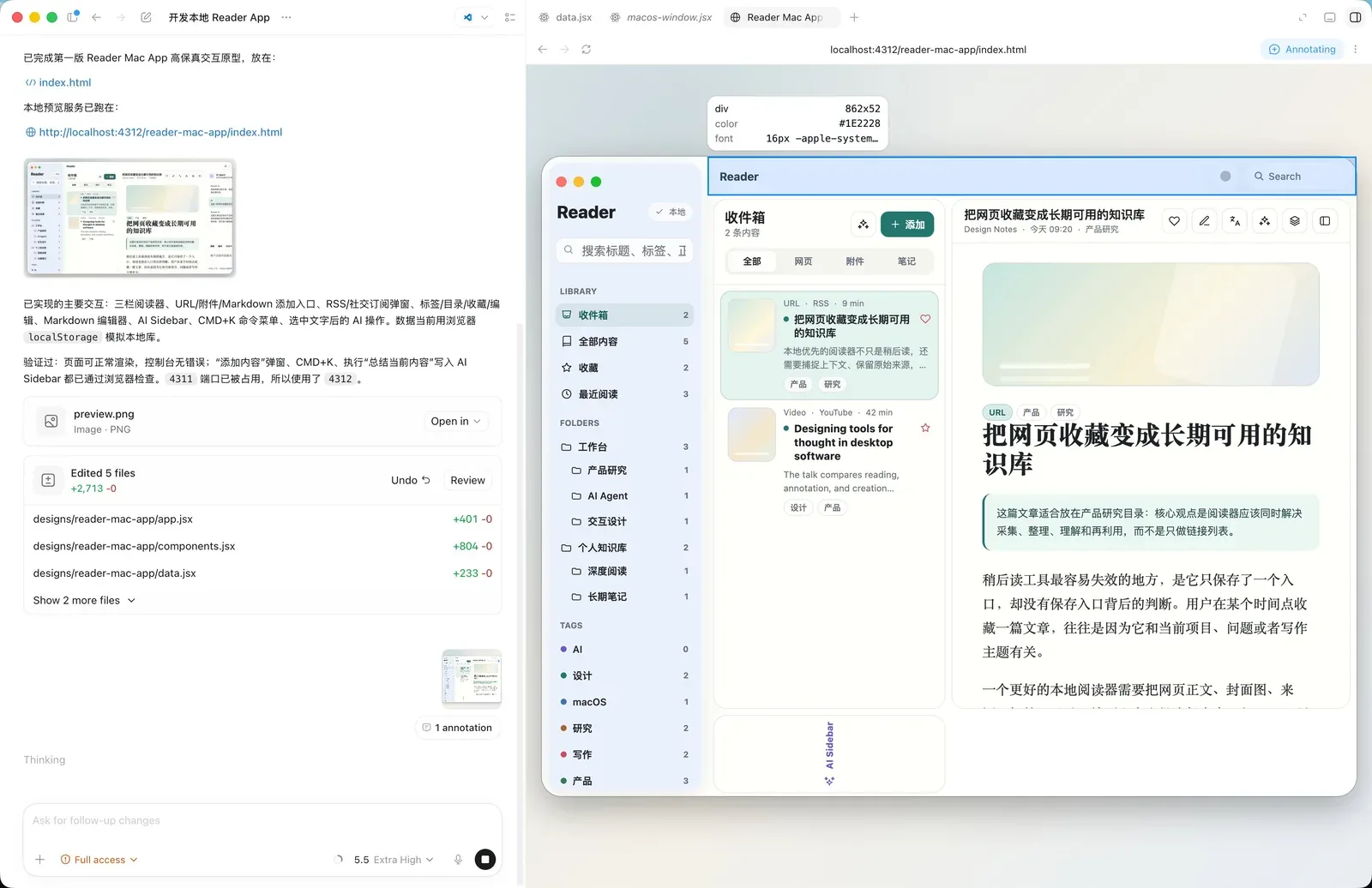
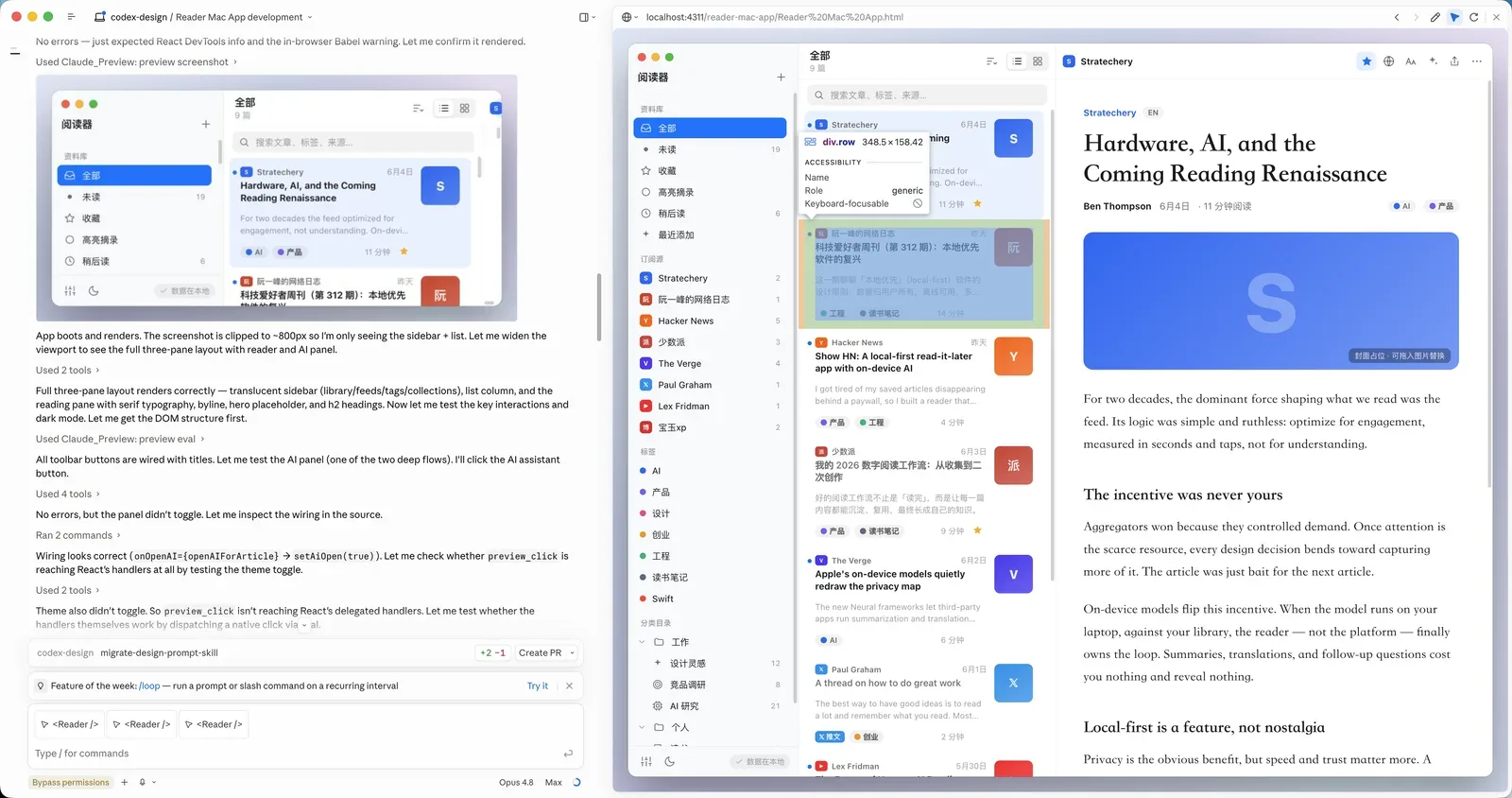
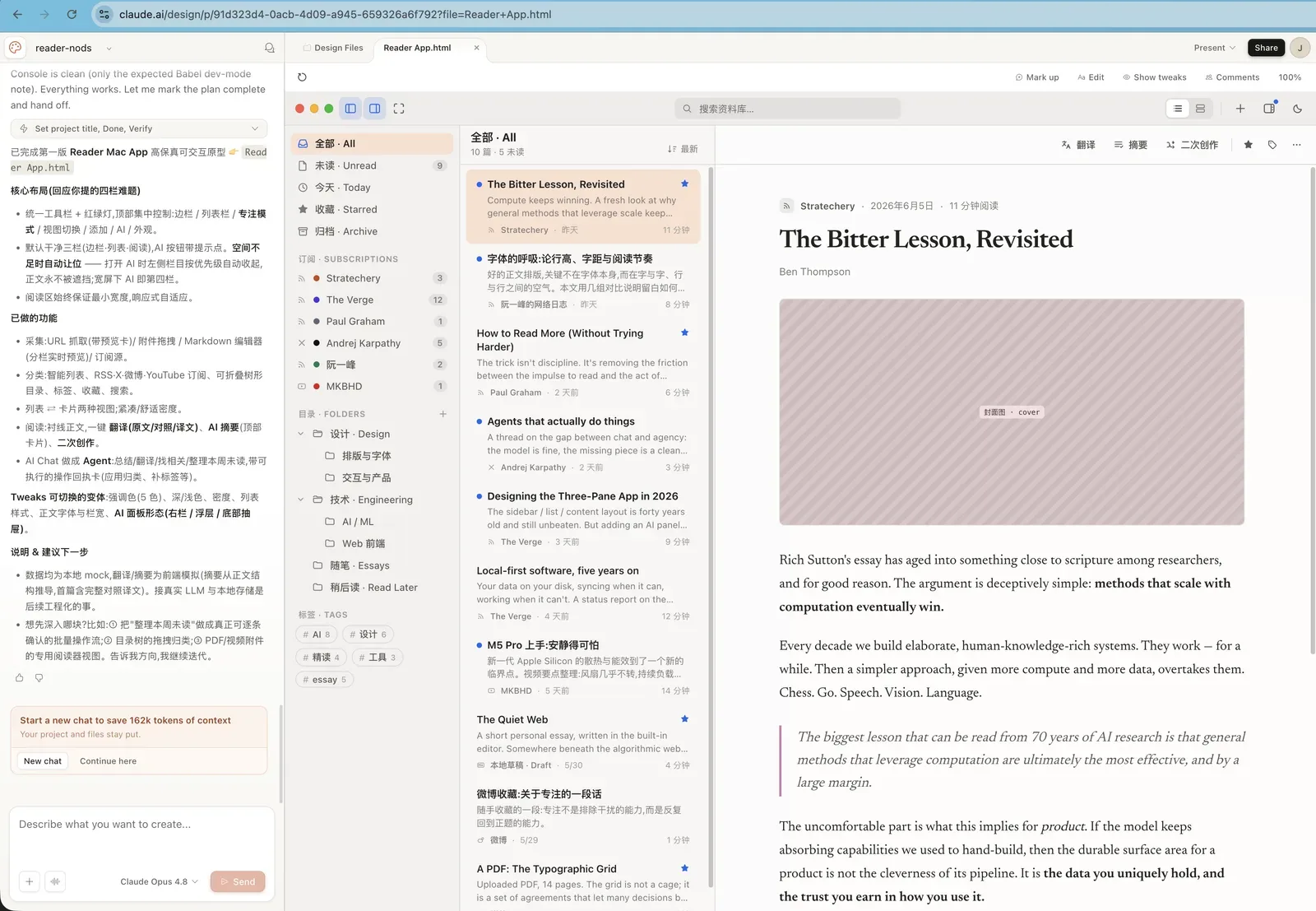
The same prompt was used in Cursor, Codex, Claude, and Claude Design.
| Cursor | Codex | Claude | Claude Design |
|---|---|---|---|
 |
 |
 |
 |
Prompt used for all screenshots
Build a Reader Mac app that helps me read and save articles better. All data is stored locally.

## Information collection

1. Manual adding
Support manually adding different types of information:
- URL: enter a URL and automatically fetch content and images
- Attachments: upload PDFs, videos, and images
- Markdown editing: like publishing a blog post, enter the title, body, and cover image
- Other

2. Automatic subscriptions
- RSS feeds
- Social media accounts: X, Weibo, YouTube
- Other

## Editing and organization

1. Tags
Every item can have tags.

2. Categories and folders
Create tree-structured folders and place content in different categories.

3. Favorites
Users can click to favorite an item.

4. Editing
Every item can be edited with a built-in Markdown editor.

## AI assistance

1. Automatic translation
Support translation across different languages.

2. Summaries and abstracts
Generate summaries for captured content.

3. Derivative creation
Create new work based on one or more pieces of content.

4. Integrated AI Chat
Use AI Chat to call AI Agents that help process content.
Core capabilities
The skill drives a full design process — clarifying questions → gathering design context → producing one or more HTML deliverables → previewing and verifying. It includes a deep bench of built‑in skills and a set of ready‑made component scaffolds.
| Area | Built‑in skills |
|---|---|
| Core design | Hi‑fi design · Interactive prototype · Wireframe · Frontend aesthetic direction |
| Decks | Make a deck · Speaker notes |
| Mobile & motion | Mobile prototype · Animated video · Sound effects |
| Web & campaigns | Website & landing page · Social media content · HTML email · Flier · Trifold brochure |
| Data & research | Web research · Data science · Data visualization · Maps & geography · Experiment workflow |
| Documents, 3D & illustration | Make a doc · 3D object · Watercolor illustration |
| Design systems | Create design system · Use design system · Design system preview · Design Components (.dc.html) · Make tweakable |
| Import sources | Figma .fig (offline decode) · GitHub repo · Existing HTML/CSS |
| Export & handoff | Standalone HTML · PDF · PPTX (editable) · PPTX (screenshots) · Video (MP4) · Send to Figma · Send to Canva · Handoff to Claude Code |
| AI assets & integration | Gemini image generation · Call Claude from prototypes · Read PDF |
Starter components (device shells, browser shells, social‑media shells, a pan‑zoom design canvas, slide, animation, chart, document, file, and 3D stages, a tweaks panel, and a fillable image slot) save the agent from hand‑rolling the basics.
How it works
- You describe a design task in plain language (e.g., “Design 3 hi‑fi variations of a settings screen for a meditation app”).
- The agent reads
SKILL.md, loads the core methodology fromsystem-prompt.md, detects which environment it's running in (Cursor, Claude Code, Codex, or a generic harness), and loads the matching tool reference. - It pulls in only the built‑in skill(s) the task needs, then generates one or more self‑contained HTML files under
designs/<project>/. - The agent starts a local HTTP preview server (usually automatically). You can point at any element in the live preview and say what to change — the agent edits the underlying source for a fast, visual second‑pass editing loop.
What you need to provide
- A local agent — Cursor, Claude Code, Codex, or any file‑capable coding agent. Cursor, Claude Code, and Codex have first‑class tool references inside the skill.
- A model — Claude Opus 4.8 is recommended for the best results. The skill works on other capable models as well.
- A design task — a plain‑language description, optionally accompanied by:
- A screenshot or image
- A Figma
.figfile (decoded fully offline, no account needed) - A GitHub repository URL
- Existing HTML/CSS files
- (Optional) A design system to use as a binding visual contract.
What you get
- Self‑contained HTML files for each deliverable (mockups, prototypes, wireframes, decks, etc.).
- Files saved in
designs/<project>/, ready to version, fork, export, or ship. - For slide decks, export to editable PPTX (with native PowerPoint animations) or screenshot PPTX.
- Other export formats: standalone HTML, PDF, MP4 video, and send to Figma or Canva.
Import design sources
Real context beats description. Three built‑in import skills turn material you already have into design ground truth the agent works from directly:
- Figma
.figfiles — decoded fully offline. Export any Figma file as.fig(or grab a community kit), point the agent at it, and a vendored decoder reads it right on your machine — no Figma account, API token, or MCP server. The agent inventories pages, components, and variables, confirms scope with you, then either cherry‑picks components as React code or emits the whole kit as a design system: components regrouped semantically, curated token CSS, real SVG/PNG assets extracted from the file (copied, never redrawn), guideline cards, and a brand‑guide README. - GitHub repos. Hand it a repo URL as a design source. The agent browses the tree with
gh apibefore cloning anything, sparse‑checkouts only the paths it needs into a scratch dir outside your project, and records the repo URL as provenance. - Existing HTML/CSS. Saved pages or a local codebase work as a design reference: the agent reads the real stylesheets instead of squinting at screenshots, lifts exact values (colors, type, spacing, radii, shadows, interaction states) into your project's own custom properties, and copies referenced assets out.
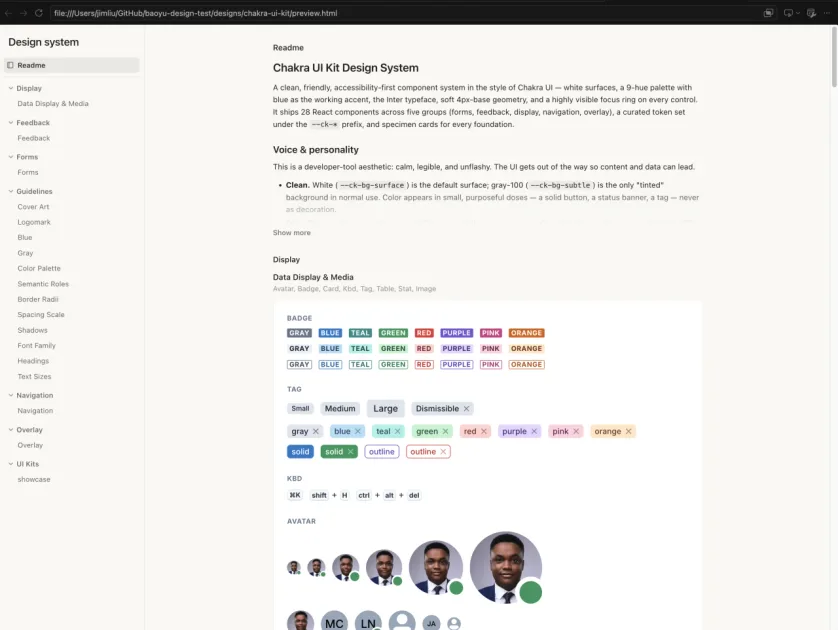
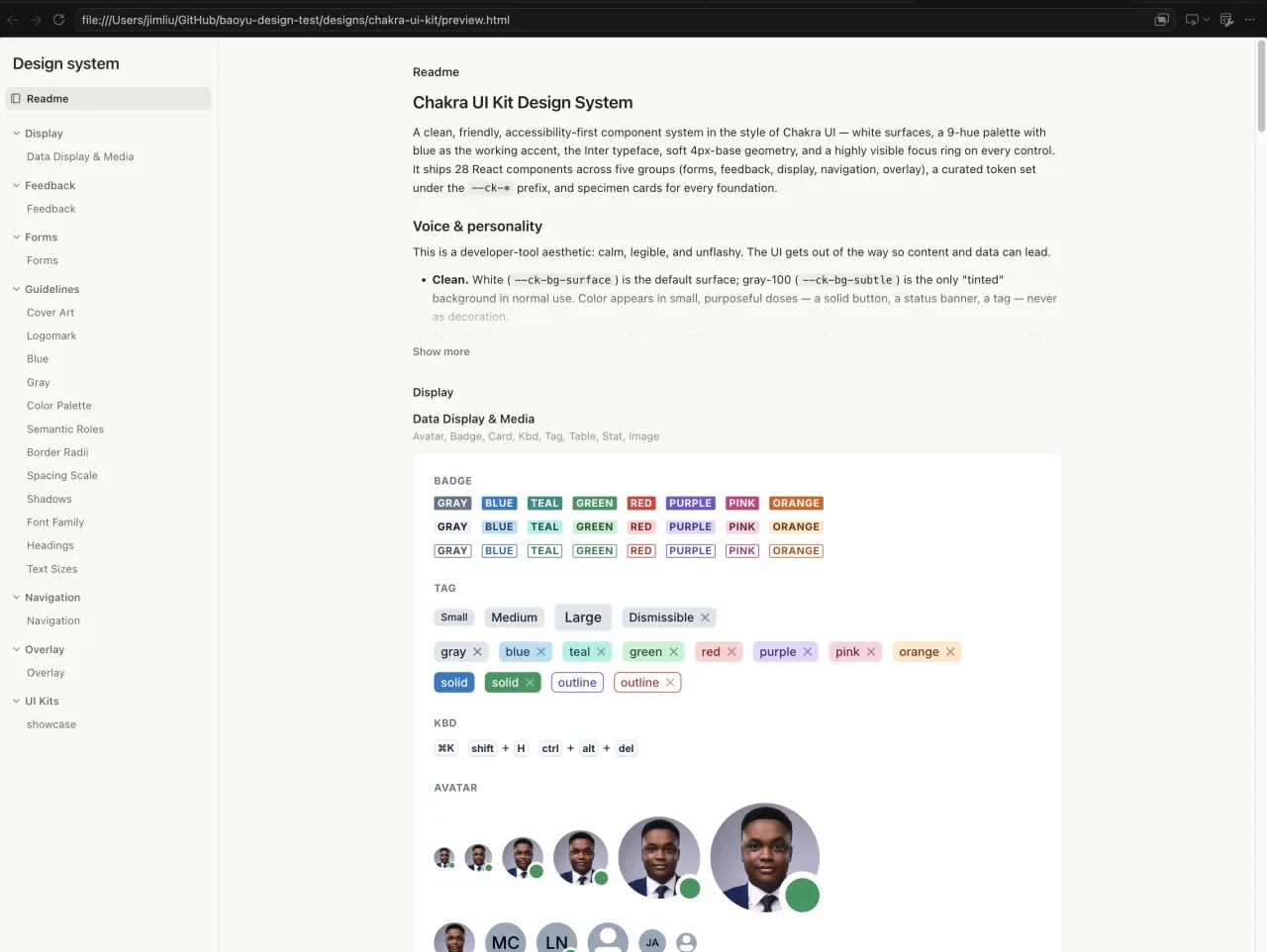
Anything imported as a design system compiles into a single self‑contained, interactive preview.html. This is the community Chakra UI Figma Kit .fig after one import conversation — 28 components in semantic groups, 400+ curated tokens, guideline cards, and a self‑authored showcase, all browsable in one file:
Example prompts
- “Design 3 hi‑fi variations of a pricing page using the brand in this screenshot.”
- “Prototype a working onboarding flow — real state, transitions, form validation.”
- “Make a 10‑slide deck from this PRD for an engineering all‑hands.”
- “Build the key‑metrics slide point by point on click, then export the deck to PPTX with the animations.”
- “Wireframe a few layout ideas for a mobile expense‑tracker home screen.”
- “Recreate the composer UI from this codebase, then export it as standalone HTML.”
- “Turn this UI kit
.figinto a design system, then build a dashboard with it.” - “Build a dashboard using our design system, starting from its analytics screen.”
Choosing your agent
The skill ships tool‑reference documents for Cursor, Claude Code, and Codex, so those agents get the most seamless experience. Other file‑capable agents will work but may lack automatic preview or screenshot features. For the best iterative workflow, choose an agent with built‑in browser preview and element‑annotation capabilities (Cursor Browser, Codex Browser, or Claude Preview).
Important notes
- Model recommendation: Use Claude Opus 4.8 for the best output. The skill is a long, demanding design brief; stronger models produce better results. It works on other models but quality may degrade.
- Preview server: Deliverables are previewed over HTTP (multi‑file prototypes won't load from
file://). The agent normally starts this for you. To run it manually:python3 -m http.server 4311 --directory designs # then open http://localhost:4311/<project>/<file>.html - PPTX export: This feature requires a local build of a helper tool. In Claude Code, you need to run the build once before the first export:
After that, the agent can export slide decks with native PowerPoint animations.cd skills/baoyu-design/agents/gen-pptx && npm install && npx playwright install chromium && npm run build - Design systems: When you bind a design system to a project, the agent uses the system's real tokens, type, spacing, and components. It will not invent off‑system colors or styles. Systems are versioned and stored in
designs/. - Figma import:
.figfiles are decoded fully offline — no Figma account, API token, or MCP server needed. The agent can extract components as React code or generate a full design system. - GitHub repo import: The agent browses the tree with
gh apibefore cloning, sparse‑checkouts only the needed paths, and records the repo URL as provenance. - Existing HTML/CSS import: The agent reads real stylesheets, extracts exact values (colors, type, spacing, radii, shadows, interaction states), and copies referenced assets.
- Output format: All deliverables are self‑contained HTML to ensure portability. Some advanced features (e.g., video export) depend on the agent's environment.