
ai-news-radar
A 24-hour AI news radar with automatic deduplication, story clustering, and expert curation.

Suggested prompts
About this skill
AI News Radar
It first picks thoroughbred sources from a flood of feeds, then merges scattered reports into storylines, and finally delivers a sharp daily headline review in three distinct flavors.
A zero‑setup Agent Skill that lets your assistant curate the day’s AI headlines for you. A single query is all it takes to get a curated AI news briefing.
Use Cases
- General readers: Quickly catch up on the latest AI developments with three distinct perspectives: Pragmatic, Cynic, and Paper Police.
- Content creators: Discover writing angles, verify credibility, and reduce redundant reading by comparing multiple sources.
- Developers: Embed AI news capabilities into your own Agent – no API key, no server maintenance.
Core Capabilities
- Smart source selection: Evaluates source quality before ingestion, filtering out noise.
- Story merging: Collapses multiple reports of the same event into a single storyline, avoiding repetition.
- Tri‑flavored reviews: Delivers three commenting lenses – Pragmatic (developer value), Cynic (exposing hype), Paper Police (evidence‑first).
- Daily curation: Automatically generates a 20‑item spotlight briefing with persona scores and endorsement reasons.
- Zero configuration: No API key, login, or server required – the Agent reads publicly available data.
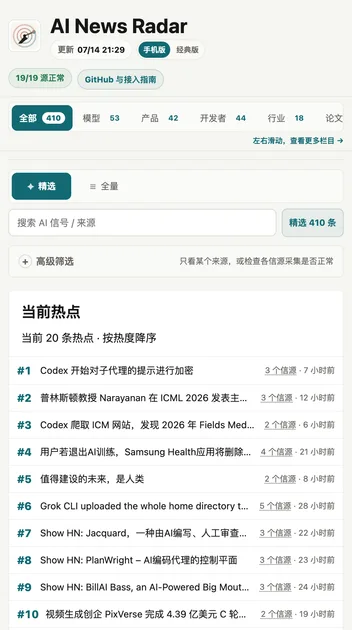
- Multi‑section categories: Supports tabs like Models, Products, Developers, Industry, Papers, Community for focused browsing.
- Source health stats: Provides fetch success rates and AI‑relevance ratios to help assess source reliability.
How It Works
- Just ask: Tell your Agent “What’s up in AI today?” and the Skill reads the latest public JSON data.
- Skill processes: It pulls information from pre‑processed datasets (daily‑brief, stories‑merged) and weaves in persona reviews.
- Returns a briefing: The Agent delivers the day’s AI headlines in natural language, each entry carrying source, review, and multi‑source collapse info.
Note: The JSON data the Skill relies on is updated automatically every 30 minutes via GitHub Actions on the project’s public server. You never need to run any scripts yourself.
What You Need
- An Agent that supports Skills (e.g., Claude Code, Codex).
- (Optional) If you want to customize sources or review flavors, you can fork the project and edit
feeds/follow.opmland the files underpersonas/.
What You Get
- A daily AI news briefing (top 20 items) with three‑flavor commentary.
- Same‑event multi‑source merging, cutting down repetition.
- Endorsement reasons for each highlighted story (when supported by the data feed).
- Source reliability indicators (fetch success rate, AI‑relevance ratio).
Example
User: What’s up in AI today?
Agent: Here are today’s AI headlines (source: AI News Radar):
- OpenAI releases GPT‑5 (multi‑source 3): Pragmatic [8/10] – Direct impact on developer ecosystem; Cynic [5/10] – Another futureshow; Paper Police [2/10] – No paper yet.
- Meta open‑sources Llama 4 (single source): Pragmatic [7/10] – Lowers deployment cost…
(Actual output is driven by real‑time data.)
Skill Selection
This project includes two Skills:
- ai-radar (Radar Skill): Consumer‑side, for reading news and producing a briefing – ideal for most users.
- Bole Skill: Maintainer‑side, for managing and ingesting sources and maintaining the fetching logic – for developers who want to build their own news radar.
If you just want AI updates, use ai-radar.
Notes
- The Skill depends on publicly hosted JSON data; make sure your Agent can reach
https://news.learnprompt.proor the corresponding GitHub Pages endpoint. - Endorsement reasons and persona reviews require an upstream
DEEPSEEK_API_KEY. The public instance may lack them, in which case reviews fall back to rule‑based scores or no reason – the briefing’s core content is unaffected. - Data refreshes every 30 minutes, though GitHub Actions may occasionally lag.
- If you fork your own version, you need to enable GitHub Actions and Pages; optionally, add API keys for advanced features (e.g., title enhancement).